I'm happy with this machine. after getting used to the setup, it works well and the drawing results are excellent. I'm enjoying experimenting with different pens. Good for creative artwork.
I'm a RE broker. My first batch of 50 letters brought a phone call from an owner now talking to me about selling — a deal that would carry roughly $40,000 in gross commission. These letters get opened.
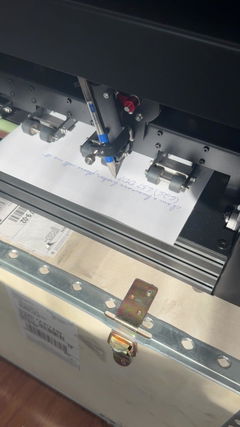
This is not a printer. It's a spring-loaded clamp holding an ordinary ballpoint, on a gantry that moves the pen like a hand. You can feel the writing on the back of the page.
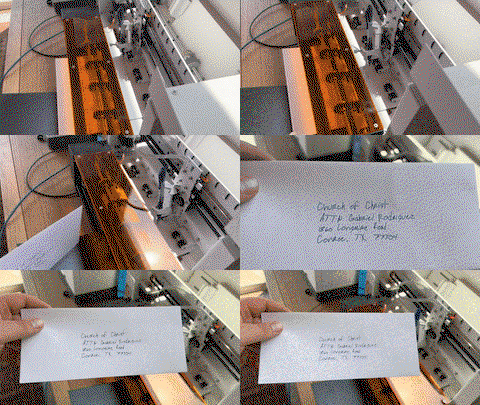
Ships in a plywood freight crate and sets up in ten minutes. Handles #10 envelopes and letterhead, writes cleanly around a pre-printed logo and footer. About 72 seconds per envelope, under 5 minutes per letter.
Best hidden feature: a local HTTP API with plain-JSON layouts. I used Claude Code to build a custom app that runs my whole mail room, and I don't write code. It also walked me through importing free commercial handwriting fonts — fast, and the quality is excellent, so you aren't limited to the eight in the box.
Fair warnings: you need a good database — the machine faithfully writes whatever junk you feed it. Load one spare sheet per stack; the feeder can miss the last one. And I've only had it a short while, so I can't speak to long-term durability yet.
Absolutely worth the money.
We’ve had the iAuto Plus for about 10 months now and have run 10,000+ pieces through it. Overall, really happy with it. The actual machine is built well and the writing looks great because, well, it’s literally a real pen writing it. There is a bit of a learning curve and the software could be better, but once you get your setup figured out it works really well. Would definitely buy again. My tip is to get CREATIVE. If you do any kind of sales, marketing, customer appreciation... it will pay for itself fast.
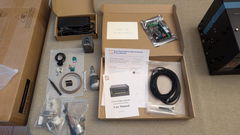
I have only just unboxed the UUNA TEK iDraw 2.0, and I’m already using it to draft ideas for my own artwork. First impressions are extremely positive.
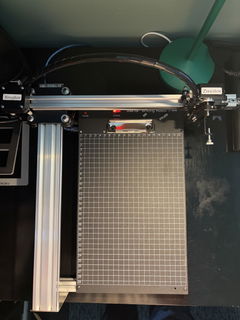
The machine arrived very securely packaged, and assembly was remarkably straightforward. UUNA TEK’s video tutorial on YouTube is clear, concise and very easy to follow, so I had the plotter assembled and ready to go with very little effort.
Setting it up with Inkscape was equally painless. It was simply a matter of opening the Inkscape Extensions folder and copying across the extension supplied in the zipped file from UUNA TEK. Once that was done, the iDraw controls were immediately available within Inkscape and I was ready to start experimenting.
What has impressed me most so far is the sheer robustness of the machine. It feels like a serious, well-engineered piece of equipment rather than a lightweight hobby gadget. The speed of the drawing is also impressive, while retaining excellent precision.
Perhaps its greatest strength, though, is how intuitively it can slot into an existing creative workflow. There is remarkably little faffing around, recalibration or technical fuss between having an idea on screen and seeing it physically drawn. For a creative tool, that matters enormously: the technology quickly gets out of the way and allows you to concentrate on what you are actually making.
The iDraw 2.0 clearly has a multitude of potential uses, but for me, as a way of drafting, developing and physically exploring ideas for my own art, I suspect it is going to prove invaluable.
A great buy, extremely well made, impressively fast and refreshingly straightforward to use.
We purchased the Uuna Tek iAuto to add an authentic, personal touch to customer shipments, mailings, cards, and postcards for our business outreach initiatives. At its price point, it offered a very affordable way to scale handwritten messaging without sacrificing quality.
Workflow & Software
Custom Messaging: We write standard messages using an XP-Pen tablet in Adobe Illustrator, export as SVG files, and send them directly to the machine.
Mail Merge: For addressing envelopes, we use the mail merge feature coupled with a custom font created using Uuna Tek's online generator app.
Learning Curve: Expect a brief setup and learning process. Adjusting layout and orientation per project takes some fine-tuning, particularly to ensure the rollers maintain a firm grip when writing close to the edges.
Hardware Performance & Practical Tips
Paper Feeding: When working with thicker stock (like 12pt cardstock), giving the cards a subtle concave bend before loading greatly improves feeding consistency.
Pen Selection: The machine accommodates a wide variety of pens. Hard-body pens hold up best and stay secured; if you use basic disposable pens like cheap Bics, make sure to clamp them tightly to avoid slippage during long jobs.
Essential Accessory: The Automatic Paper Dropping Accessory is a must-have for unattended operation. Without it, the unit can only handle a few pieces before pages pile up and cause ink transfer. Propping the back of the machine up slightly helps heavier stock drop cleanly into the output stack.
Build Quality & Maintenance
This machine is built like a tank. The solid metal housing and heavy-duty internal components feel extremely durable. The feed rollers are large, grippy, and easy to keep clean.
During a recent peak week, we ran over 5,000 postcards through the machine in 7 days, and it performed smoothly without a hiccup. The included extra parts kit offers great peace of mind, and Uuna Tek's official YouTube channel makes self-maintenance straightforward.
Verdict
If you are willing to learn the nuance of layout setup and pair it with the paper dropping tray, the iAuto is a true workhorse. We look forward to getting years of reliable use out of ours!